
Article
PHP IDEs for Docker
Configure editors around container interpreters, mounts, Composer, Xdebug, and repeatable commands.

Choose where tools execute
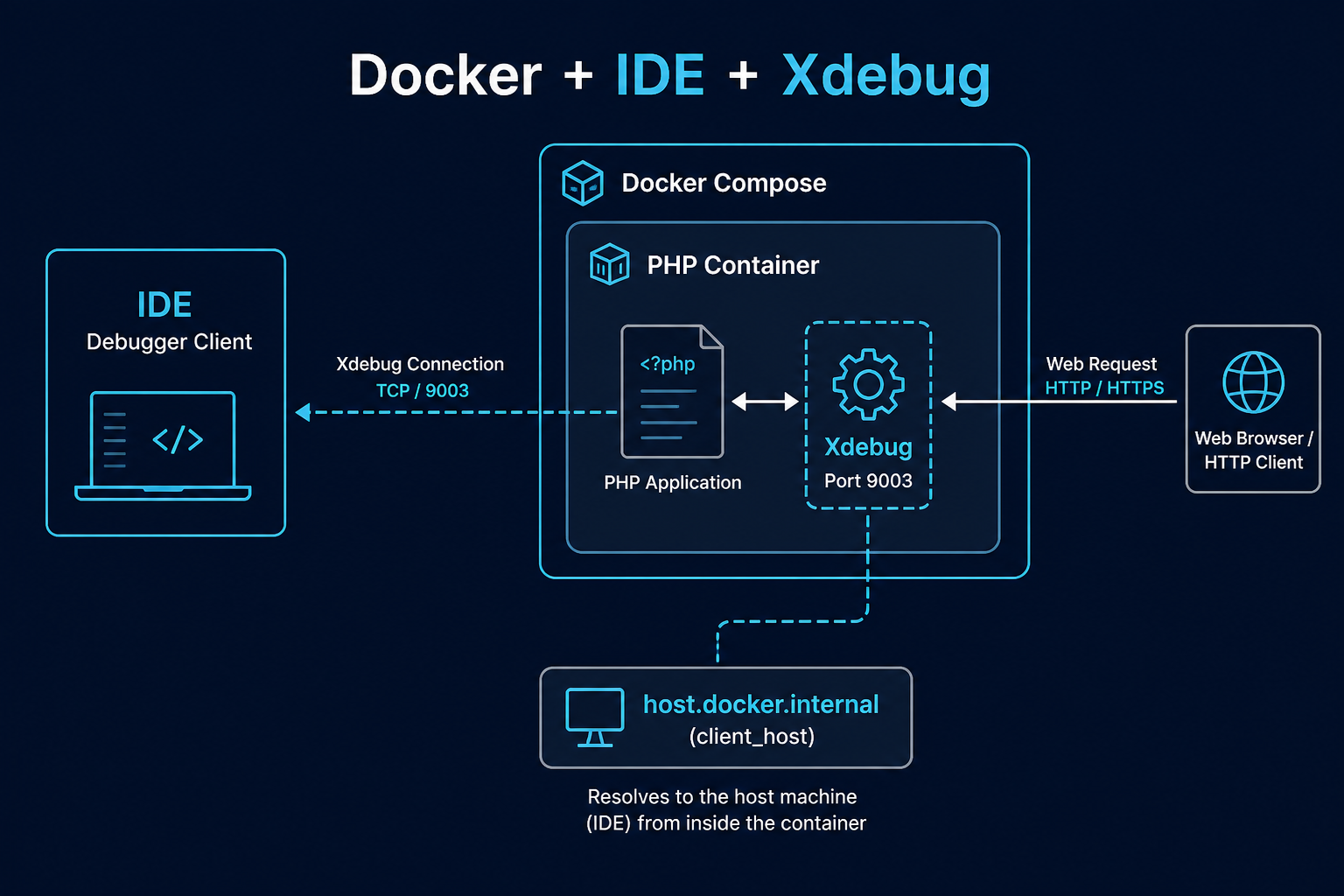
A Docker-aware PHP environment must decide whether Composer, tests, language servers, and debuggers run on the host or in a container. PhpStorm supports Docker interpreters. VS Code Dev Containers can place extensions and terminals inside a defined environment. Other editors can invoke docker compose commands without offering a full remote workspace.
The correct model depends on filesystem performance and how closely the container matches production. Avoid mixing host vendor dependencies with a container running a different PHP version.
Xdebug networking
Xdebug initiates the connection from the PHP container to the IDE. Configure xdebug.client_host for the platform, expose or route port 9003 as needed, and map container paths such as /var/www/html to local paths. Publishing the port is not always required because the connection direction matters.
Performance and permissions
Bind mounts can be slow on desktop virtualization and can create UID/GID ownership problems. Use named volumes or container-native dependency directories where appropriate, and do not solve permission errors with broad chmod. Exclude runtime caches from editor indexing.
Proof before standardization
From a clean clone, build the stack, install Composer dependencies, run a test, receive an Xdebug session, stop and restart containers, and verify files retain safe ownership. Check that editor tasks use the same service names documented in compose.yaml.
Verification and maintenance
PHP IDEs for Docker was reviewed for this seed on 2026-08-09. Before adopting its recommendations, confirm current releases, platform support, licensing, extension publishers, and configuration syntax through Docker PHP Guide at the official source linked below. Product status and plugin compatibility can change independently of this editorial record.
Test changes on a representative repository and keep Composer scripts, automated tests, static analysis, and version control authoritative. If official documentation no longer supports a claim made on /ide/php-ide-for-docker/, mark the fact unknown or update it from a primary source rather than filling the gap from an old tutorial or download mirror.
Related tools
- Composer.json Validator Validate composer.json structure and common mistakes without running composer install.
- Legacy PHP Risk Checker Paste PHP source for a static scan that classifies removed APIs, deprecated calls, and security-sensitive leg…
- PHP Deprecated Checker Find deprecated functions and patterns in pasted PHP to prioritize modernization work.
- PHP Environment Compare Compare two PHP environment summaries to find directive and extension mismatches.
- PHP Modernization Roadmap Build an ordered migration stage list from your PHP version, framework, Composer, database API, and deploymen…
- PHP Version Compatibility Checker Scan pasted PHP for version-sensitive syntax and APIs to plan upgrades across PHP releases.
Related reading
- Best PHP IDEs and Editors in 2026 A requirements-led shortlist of current PHP IDEs and editors, with conservative feature claims.
- Best Free PHP IDEs and Editors Compare genuinely useful no-cost PHP environments without treating plugin-based support as built in.
- PHP IDEs for Windows Current Windows PHP choices for native, WSL, Docker, and remote workflows.
- PHP IDEs for Linux Choose a PHP environment for local Linux, containers, SSH servers, and low-resource desktops.
- PHP IDEs for macOS Select a PHP editor on macOS with attention to Apple Silicon, local runtimes, containers, and remote work.