
Article
PHP IDEs for Remote Development
Choose between SSH workspaces, remote agents, containers, synchronization, and terminal editing.

Remote development has distinct models
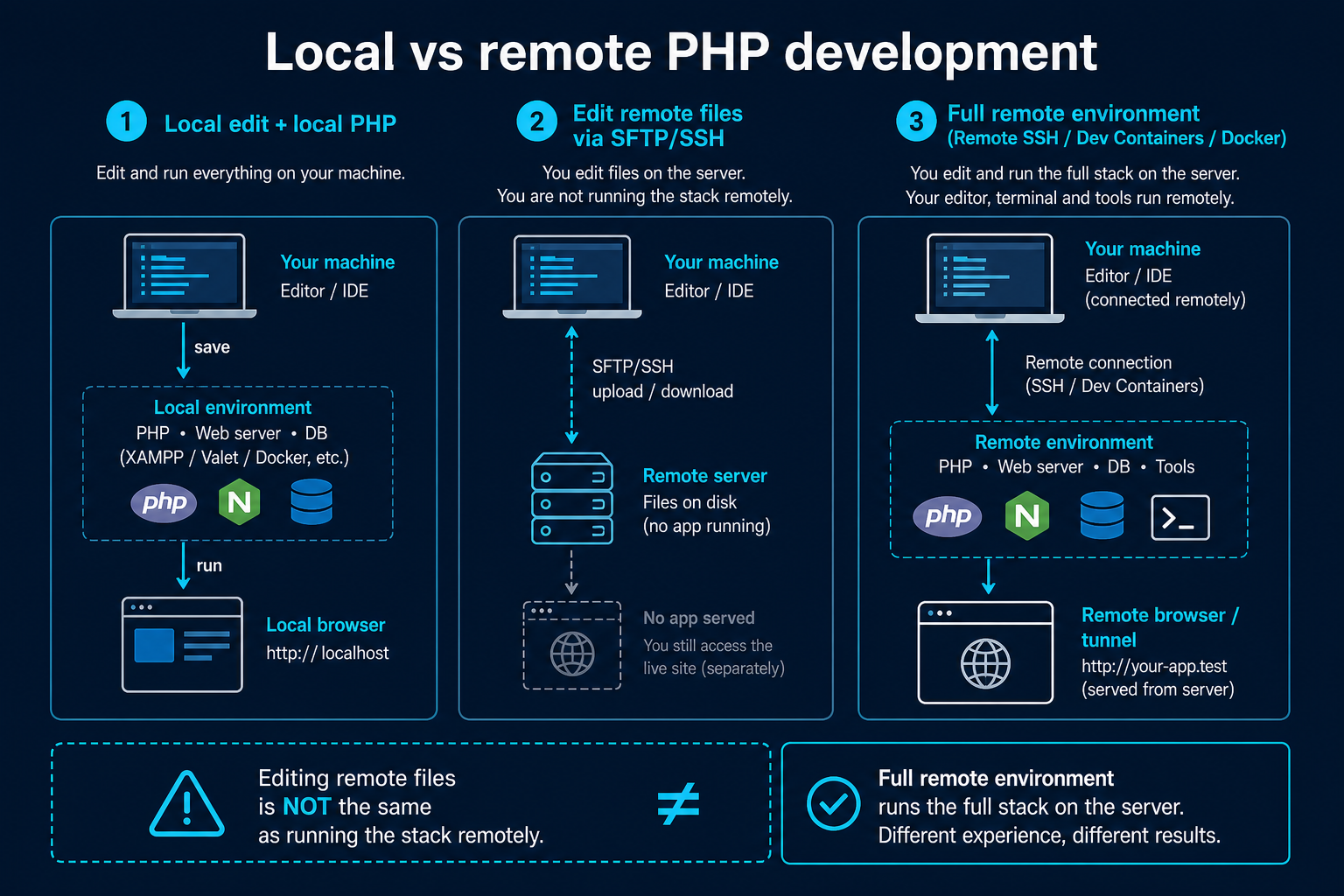
A local editor can run tools on a remote host through an agent, edit files through a filesystem protocol, synchronize copies, or run entirely in an SSH terminal. VS Code Remote SSH, Zed remote development, JetBrains remote options, and terminal Neovim/Emacs represent different models. NetBeans documents FTP/SFTP remote projects.
These are not equivalent. Running the language server beside source avoids slow network indexing; synchronization creates two copies that can conflict; direct server editing may bypass review and deployment.
Prefer development hosts, not production
Use a disposable or controlled development machine with least-privilege access. Keep production credentials out of editor settings, use SSH keys with appropriate scope, and require version control before deployment. A convenient remote feature must not become an undocumented release mechanism.
Debugging across networks
Xdebug normally connects back toward the IDE. SSH port forwarding can bridge restricted networks, but document direction, port, and hostname. Map remote paths and avoid exposing a debugger listener to the public internet.
Evaluation
Disconnect and reconnect, run Composer remotely, restart the language server, debug one request, inspect terminal environment variables, and verify unsaved work behavior. Confirm what code or telemetry leaves the host when AI features are enabled.
Verification and maintenance
PHP IDEs for Remote Development was reviewed for this seed on 2026-08-09. Before adopting its recommendations, confirm current releases, platform support, licensing, extension publishers, and configuration syntax through Zed Remote Development at the official source linked below. Product status and plugin compatibility can change independently of this editorial record.
Test changes on a representative repository and keep Composer scripts, automated tests, static analysis, and version control authoritative. If official documentation no longer supports a claim made on /ide/php-ide-for-remote-development/, mark the fact unknown or update it from a primary source rather than filling the gap from an old tutorial or download mirror.
Related tools
- Composer.json Validator Validate composer.json structure and common mistakes without running composer install.
- Legacy PHP Risk Checker Paste PHP source for a static scan that classifies removed APIs, deprecated calls, and security-sensitive leg…
- PHP Deprecated Checker Find deprecated functions and patterns in pasted PHP to prioritize modernization work.
- PHP Environment Compare Compare two PHP environment summaries to find directive and extension mismatches.
- PHP Modernization Roadmap Build an ordered migration stage list from your PHP version, framework, Composer, database API, and deploymen…
- PHP Version Compatibility Checker Scan pasted PHP for version-sensitive syntax and APIs to plan upgrades across PHP releases.
Related reading
- Best PHP IDEs and Editors in 2026 A requirements-led shortlist of current PHP IDEs and editors, with conservative feature claims.
- Best Free PHP IDEs and Editors Compare genuinely useful no-cost PHP environments without treating plugin-based support as built in.
- PHP IDEs for Windows Current Windows PHP choices for native, WSL, Docker, and remote workflows.
- PHP IDEs for Linux Choose a PHP environment for local Linux, containers, SSH servers, and low-resource desktops.
- PHP IDEs for macOS Select a PHP editor on macOS with attention to Apple Silicon, local runtimes, containers, and remote work.