
Article
Configure Xdebug in PhpStorm
A current Xdebug 3 workflow for local, CLI, container, and remote PHP.

Verify PHP before touching the IDE
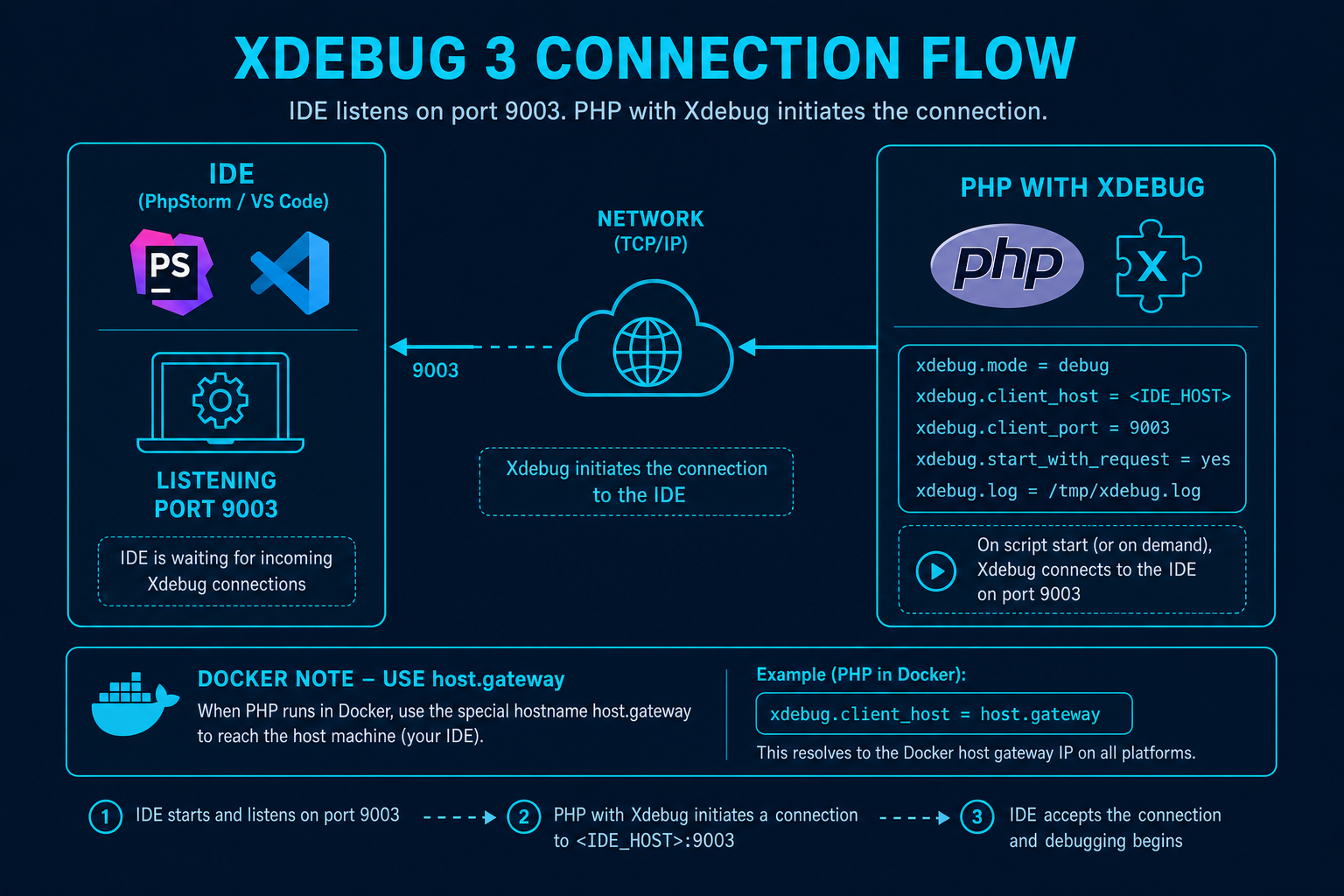
Install Xdebug for the exact PHP binary and confirm it in php --version for CLI or xdebug_info() for web. Xdebug 3 commonly listens back to an IDE on port 9003 and requires debug mode. The active ini can differ between CLI and FPM.
Configure PhpStorm
Select the real local, Docker, WSL, or remote interpreter. Define a PHP server for web requests, including host and path mappings, then enable listening for PHP debug connections. Use a browser trigger or xdebug.start_with_request according to the development policy.
Diagnose path mapping
When a session arrives but misses a breakpoint, inspect the server filename. Map that exact container or remote prefix to the local source root. Avoid mapping vendor or public as the project root when composer.json lives above them.
Prove the smallest case
Break in a short script, inspect a variable, then move to PHPUnit and the framework front controller. Keep Xdebug off or trigger-only in shared environments and never expose its connection path indiscriminately.
Verification and maintenance
Configure Xdebug in PhpStorm was reviewed for this seed on 2026-08-09. Before adopting its recommendations, confirm current releases, platform support, licensing, extension publishers, and configuration syntax through JetBrains PhpStorm Xdebug Help at the official source linked below. Product status and plugin compatibility can change independently of this editorial record.
Test changes on a representative repository and keep Composer scripts, automated tests, static analysis, and version control authoritative. If official documentation no longer supports a claim made on /ide/phpstorm/xdebug/, mark the fact unknown or update it from a primary source rather than filling the gap from an old tutorial or download mirror.
Related tools
- Composer.json Validator Validate composer.json structure and common mistakes without running composer install.
- Legacy PHP Risk Checker Paste PHP source for a static scan that classifies removed APIs, deprecated calls, and security-sensitive leg…
- PHP Deprecated Checker Find deprecated functions and patterns in pasted PHP to prioritize modernization work.
- PHP Environment Compare Compare two PHP environment summaries to find directive and extension mismatches.
- PHP Modernization Roadmap Build an ordered migration stage list from your PHP version, framework, Composer, database API, and deploymen…
- PHP Version Compatibility Checker Scan pasted PHP for version-sensitive syntax and APIs to plan upgrades across PHP releases.
Related reading
- Best PHP IDEs and Editors in 2026 A requirements-led shortlist of current PHP IDEs and editors, with conservative feature claims.
- Best Free PHP IDEs and Editors Compare genuinely useful no-cost PHP environments without treating plugin-based support as built in.
- PHP IDEs for Windows Current Windows PHP choices for native, WSL, Docker, and remote workflows.
- PHP IDEs for Linux Choose a PHP environment for local Linux, containers, SSH servers, and low-resource desktops.
- PHP IDEs for macOS Select a PHP editor on macOS with attention to Apple Silicon, local runtimes, containers, and remote work.